
What My Local LLM Setup Taught Me About Cloud Models (and Myself)
This Thursday I came down with Influenza A. Fever, body aches, couch for two days straight. Somewhere in the middle of it, half watching something I wasn't really following, I realized I hadn't written anything on this site in four months. Not a draft, not a note, nothing. I was just quietly not writing while quietly building something else.
That something else is a local LLM inference stack. A second machine running language models on my own hardware, wired into the same coding harness I use for cloud models, so a rate limit or an outage never has to be the reason I stop working. Being stuck on the couch for two days turned out to be exactly the amount of forced stillness I needed to finally sit down and write it up. So here it is, config and all.
Why bother with local at all
Between an internship and freelance work, a good chunk of my day to day coding runs through agentic tools now, mostly because it's faster for the repetitive parts. But once you build a workflow around an agent that reads files, runs bash commands, and edits code across a long session, you notice fast how much of that speed relies on a connection staying open. I hit my Claude API limit at 11pm mid debug one too many times, staring at a stack trace I didn't fully understand yet, and decided I wanted a fallback that didn't depend on anyone else's rate limit.
Local models don't beat cloud models on raw capability. That was never the goal. What I wanted was something reliable enough to trust mid session, rather than a toy I'd fire up once and forget about, and that shaped almost every decision that followed.
Why I forked Claude Code instead of switching tools
Before I get into the machine and the model, I want to explain the harness, because this part matters more than people usually expect.
There are plenty of agentic coding tools that have popped up recently, some of them built specifically to run against local models out of the box. I looked at a few early on and didn't end up using any of them. I've used Claude Code for coding for over a year now. I know how it plans, how it edits, how it decides when to ask before running something risky. I didn't want to throw a year of built up habits away just to get a local model talking to an agent.
So instead of adopting a new harness, I forked Claude Code itself. That's what codyclaude is: an actual fork of the source, patched in the places that assumed you were always talking to Anthropic's cloud API, so it can also talk to a model running on my own network.
This comes with a real cost. Every patch I write is a patch I now own and have to maintain. When the upstream project changes something, I have to go check whether my patches still apply, and sometimes they don't. But I'd rather carry a handful of patches on a tool I already trust than learn a brand new harness that might not handle plan mode, or thinking output, or tool calls, the same way Claude Code does. I already know where the bodies are buried in this one. I'd rather deal with familiar problems than go find new ones.
The hardware
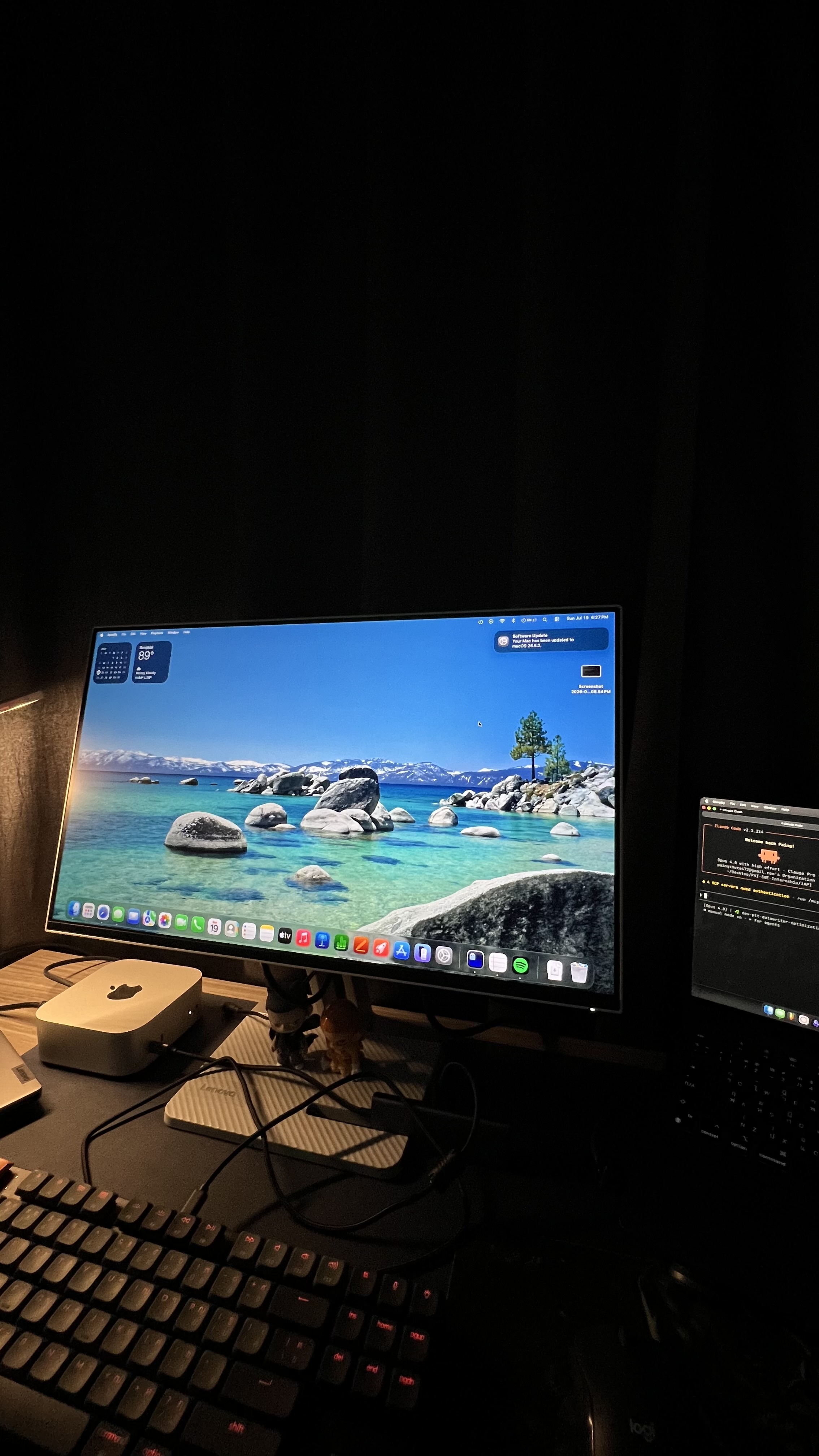
I dedicated a Mac mini M4 with 24GB of unified memory to this and nothing else. Docker, which used to live on the same machine, got moved off to my MacBook Air so it wouldn't compete for memory during inference. The MacBook Air is now purely the client, and it's what I actually code from, connecting to the Mac mini over the local network.
24GB sounds like a lot until you start budgeting it. Set aside headroom for the OS, leave room for a large context window, and remember that a Mac's "unified memory" number is not the same thing as usable GPU memory for a model. What's actually left to spend on weights and KV cache is closer to 18 to 20GB. That number became the hard ceiling for every model I looked at, and it ruled out a lot of tempting options before I even got to testing them.
Choosing a model: the filter that actually worked
I went through a lot of candidates before landing on one, and I ended up with a strict filter, applied in order, because doing it in any other order wasted my time.
- Tool Use badge. Does the model actually support structured function calling, confirmed, not just claimed on a model card. Agentic coding falls apart without reliable tool calls.
mlx-lmbuild, notmlx-vlm. This one cost me a debugging session I didn't need to have. Vision capable models get converted throughmlx-vlm, and I found out, the hard way, then confirmed it by filing a bug against LM Studio, thatmlx-vlmbuilds silently block KV cache quantization. The model runs, it answers, everything looks fine on the surface, and the cache is just sitting there uncompressed the whole time, eating memory I'd budgeted for something else.- Text only, no vision tower. I don't need a coding model that can also describe photos. Every parameter spent on a vision encoder is memory not spent on the thing I actually use.
- Fits in 18 to 20GB at 128k context. Not negotiable. More on why 128k specifically in a bit.
- Only then, benchmark it and see how it actually feels to work with.
It's tempting to start with "which model benchmarks best" and work backwards from there. Plenty of models that benchmark well fail step 2 or step 3, and you don't find that out until you've already spent an evening on one.
Somewhere in this process I also learned that MoE, mixture of experts, architecture never reduces the RAM a model needs resident. It only reduces the compute spent per token. A sparse MoE model can still demand more memory than a dense model of similar output quality, which undid a couple of assumptions I'd walked in with and cost me a bit of pride.
I landed on Qwen3.5-9B, MLX converted, running at 4 bit.
The runtime: oMLX, and what I actually set
I run it on oMLX 0.6.2, which exposes an Anthropic compatible /v1/messages endpoint. That means codyclaude can talk to it exactly like it talks to the real API, just pointed at a different URL instead of Anthropic's servers. oMLX replaced LM Studio, which I used earlier in this project and moved off once oMLX's cache handling turned out to fit my constraints better.
The settings that actually mattered, in plain terms:
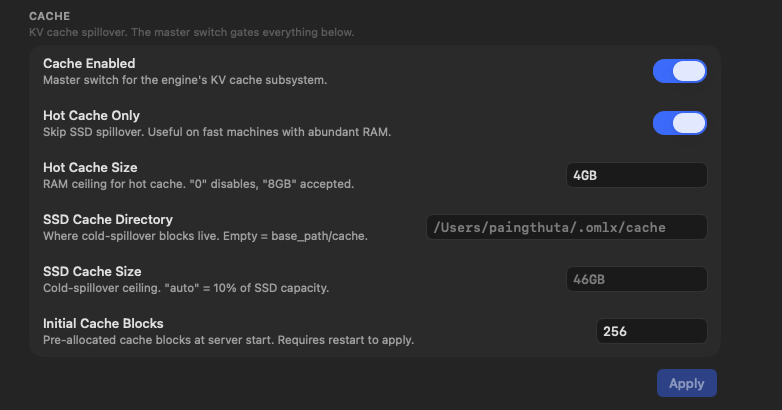
- Hot Cache Only. RAM only caching, zero SSD writes. This is the single most important setting in the whole stack, and I'll explain why in a second.
- Hot Cache Size: 4GB.
- Max Concurrent Requests: 1. I run one sequential agent at a time, not a batch of parallel ones. Setting this higher just reserves KV cache slots I'll never touch.
- TurboQuant KV cache at 4 bit. This is what makes a 128k context window actually fit inside the memory budget instead of just existing on paper.
max_model_len: 128000, confirmed against real behavior, not just left as a config value I assumed was true.
I deliberately skipped speculative decoding. DFlash, using the z-lab PARO drafter built for Qwen3.5-9B, would have sped things up. But the drafter model itself is roughly 8GB on its own, and I didn't have that much spare headroom on top of everything else already running. Faster answers weren't worth trading away context budget for.
Why "Hot Cache Only" is the whole point
The SSD in an M4 Mac mini is soldered to the board and cryptographically paired to it. You don't replace it when it wears out, you replace the entire machine. Once that sank in, it became the filter every other setting had to pass through: does this cause regular multi gigabyte writes to disk? KV cache spilling over to SSD under memory pressure, which some setups do by default, was an immediate no for me, no matter what speed it would have bought. Hot Cache Only keeps everything in RAM and treats SSD writes as something to actively avoid, not a normal cost of doing business.
Wiring it into codyclaude
Pointing codyclaude at the Mac mini instead of the cloud API means setting a handful of environment variables through my launcher script:
ANTHROPIC_BASE_URL=http://192.168.1.107:8000
ANTHROPIC_MODEL=Qwen3.5-9B-MLX-4bit
CLAUDE_CODE_LOCAL_MODEL_CONTEXT_WINDOW=128000
CLAUDE_CODE_MAX_CONTEXT_TOKENS=128000
CLAUDE_CODE_USE_LMSTUDIO=1
CLAUDE_CODE_ATTRIBUTION_HEADER=0
Two of these have stories behind them.
CLAUDE_CODE_USE_LMSTUDIO=1 stays set even though I moved off LM Studio entirely. I tried removing it once, on the assumption that a flag named after a tool I don't use anymore shouldn't matter. It broke two patches I'd made to the fork: a crash fix in the /model command, and the patch that controls how thinking output gets displayed. Both live behind code paths gated on that flag being true. So it stays, permanently, as a flag whose name no longer describes what it actually does. Which is its own small lesson about reading the code instead of trusting what a variable is called.
CLAUDE_CODE_ATTRIBUTION_HEADER=0 I found the hard way. One night everything got slower. Close to 90% slower, and nothing in the model's own output explained why. It took a few hours of diffing configs line by line before I found it: this header was invalidating the prompt cache on every single request. The model never complained about it. It just quietly ate the extra latency and kept answering like nothing was wrong. That was the moment I stopped trusting a model's own behavior as proof that something was working correctly, and started reading logs and tool call traces instead. It's a rule I apply everywhere in this project now: verify with logs, not with whatever the chat window seems to be telling you.
Two more settings worth mentioning:
- Context Overflow: Stop at Limit, not Rolling Window or Truncate Middle. codyclaude has its own compaction logic built in, and letting the runtime silently drop or reorder context underneath it causes corruption that's genuinely hard to notice until output quality drops for reasons that don't show up anywhere obvious in the logs.
- Baseline context overhead is around 25k tokens before I've typed a single word. System prompt, tool schemas,
CLAUDE.md, directory tree injection, all of it adds up before the actual conversation starts. That's what made 128k feel like a practical floor rather than a nice number to aim for. At smaller context windows, a real chunk of the budget is already gone before I've said anything.
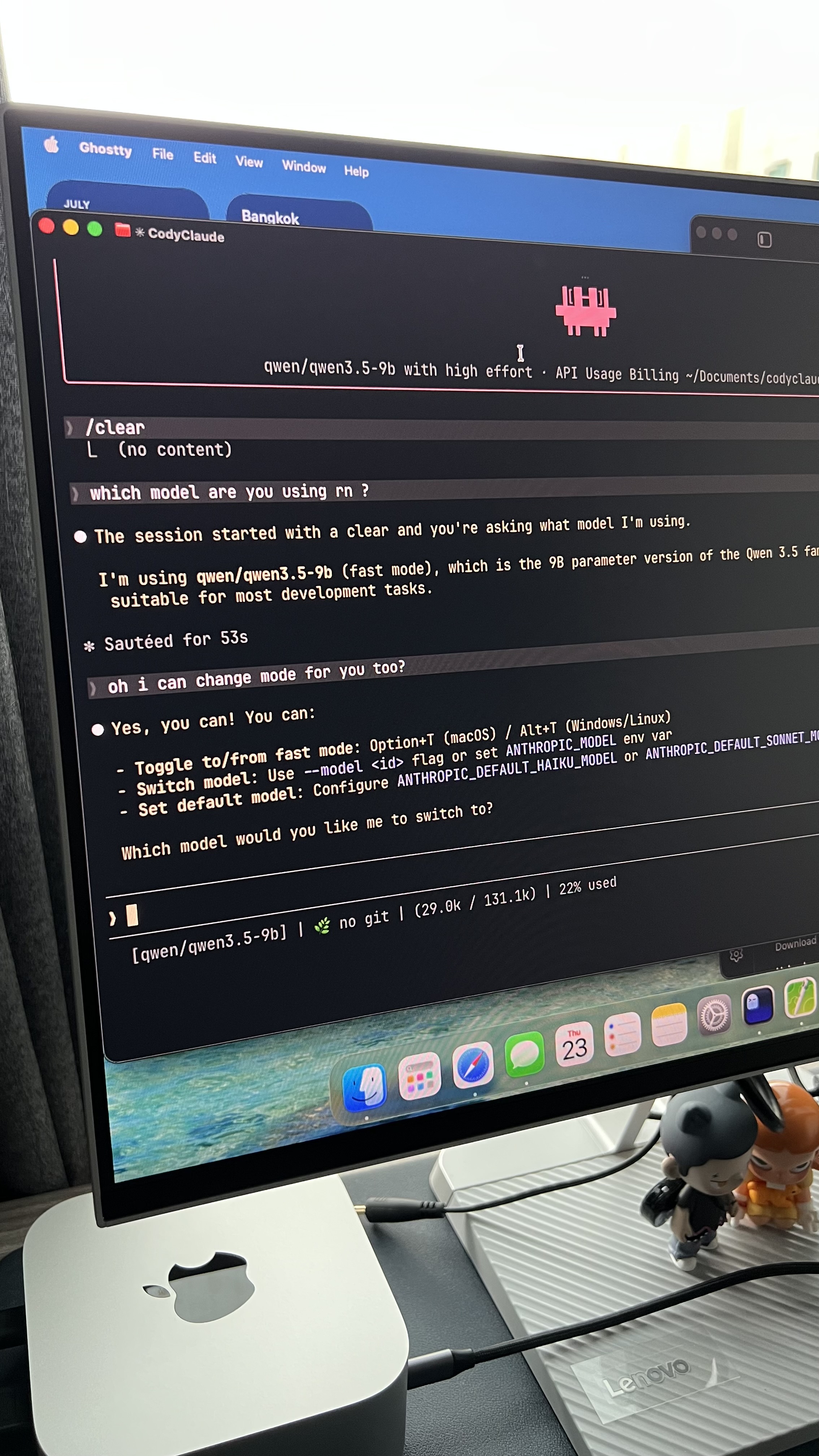
I've already run real tool calls, Read and Bash, through codyclaude against the local model, not just chat responses. They came back correctly, matched what I expected, and behaved the same way they do against the cloud API. That was the test that actually mattered to me, more than any benchmark number, and it passed.
Cloud and local aren't competing. They're doing different jobs.
I assumed, going in, that I'd use the local setup strictly as a backup. Cloud when it's up, local when it isn't.
It settled somewhere else. I reach for one or the other now based on what I actually need out of a session, whether the cloud API happens to be available or not.
Under time pressure, a hotfix, a feature due today, a bug someone's actively waiting on, I want the cloud model. It's faster, sharper on hard problems, and I don't want to think about my own infrastructure at all in that moment. I want output, now.
When I'm trying to actually learn something, an unfamiliar library or a bug I don't yet understand the shape of, I reach for local. The local model doesn't explain things better. It's slower, and the slowness turns out to be the point. While a 9B model chews through a debug loop, I'm reading the docs it should be reading, or tracing the code path myself. Sometimes I write the fix by hand before it finishes generating one.
The thing I didn't expect to notice about myself
Here's the part I keep coming back to. When a frontier cloud model handles a task well, writes the function, fixes the bug, explains why, it's easy to walk away feeling like I did it. I prompted, I reviewed, I merged. For a while that felt like competence.
Then I'd hit a similar bug a week later with no model in the loop, and realize I couldn't reproduce what I thought I'd learned. The model had done the thinking. I'd done the typing and the approving.
Those aren't the same skill. For longer than I'd like to admit, I let myself believe they were.
That's not an argument against cloud models. I still reach for them constantly, and I'm not about to pretend hand writing everything makes you a better engineer. It's an argument for noticing the difference between shipping something and actually understanding it, and being honest with yourself about which one a given session actually gave you. Cloud is very good at the first. Local, slow and occasionally annoying as it is, has been what's giving me the second.
What's still unfinished
I still have a semantic search layer to build on top of all this. The plan is Ollama running nomic-embed-text for embeddings, a self hosted Milvus instance as the vector store, and a context7 MCP server for live documentation lookup. The goal is to let codyclaude query a codebase instead of dumping whole files into context every time it needs to know something. If nomic-embed-text doesn't hold up on search quality once it's actually running, mxbai-embed-large or qwen3-embedding are next in line to try.
I also went through my Claude Code skills directory recently and cut it from over 200 skills down to about 23. Just the ones covering the stack I actually use day to day, .NET, Go, Node and TypeScript, plus a handful of workflow patterns. Every skill loaded adds baseline token overhead before a session even starts, and most of those 200 were dead weight I'd picked up without noticing.
What I learned
What I run now isn't local first or cloud first. It's a hybrid I switch between on purpose, and the reasons for reaching for local turned out to be bigger than just the learning angle I started with. There are really three of them now.
The first is depth, the one I already walked through above. Local slows me down in a way that keeps me honest about what I actually understand.
The second is quota. Every prompt against the cloud API spends real tokens against a real limit, and not everything I ask a model deserves to spend them. A lot of a coding session is exploratory. Reading through a file I don't understand yet, trying an approach just to see if it holds up, asking the same question two different ways because the first answer didn't quite land. None of that needs the frontier model. Routing that kind of work to the Mac mini means my cloud budget is still sitting there when I hit a genuinely hard bug, or a problem I can't afford to get wrong on the first try. It's a way of protecting the budget for when it actually matters.
The third is privacy. Nothing that runs against the Mac mini leaves my network. No code, no file contents, no context gets sent anywhere. For a lot of what I write day to day that doesn't matter much. But for anything under an NDA, anything client related, anything I'd rather not have pass through a third party's servers at all, local stops being a nice to have and becomes the only option that's actually appropriate.
I didn't design the setup around all three from the start. I backed into it. First by chasing depth, then by watching my cloud usage numbers, then by noticing how much lighter I felt handing sensitive code to a model that never left my desk.
All three are worth having. I just stopped pretending cloud and local were doing the same job. And it turns out a flu induced two days on the couch was exactly what it took to sit still long enough to finally write that down.